Your Keycloak realm belongs in Terraform, not the admin console
Keycloak’s admin console is genuinely good. It has a form for everything — clients, roles, groups, protocol mappers, authentication flows — and you can build a working realm in an afternoon without touching a config file. That is exactly why so many Keycloak realms end up living there, and only there.
I did the same thing when I started building a Keycloak lab: a multi-tenant document API with six client apps hanging off it. I clicked the realm together, got it working, and then tried to make a second one for the cloud.
The problem with a realm you clicked together
Here is what I could not answer about my own realm:
- What changed? Someone toggles “Full scope allowed” on a client. There is no diff, no commit, no author. Two weeks later authentication behaves differently and nothing in your repository explains why.
- Is staging the same as production? The only honest way to check is to open both consoles side by side and compare tabs by eye. Across nine clients and their protocol mappers, that is not a check anyone does twice.
- How do I rebuild this? A realm export is a 3,000-line JSON blob with generated IDs in it. It is a backup, not a source. You cannot review it, and you cannot sensibly edit it by hand.
The failure mode is not dramatic. Nothing breaks on the day someone clicks the wrong toggle. It breaks weeks later, in an environment nobody clicked the same way, and the console tells you what the realm is while carefully hiding how it got that way.
So the realm went into Terraform. Not exported to Terraform — defined in it, as the only source of truth, with the admin console demoted to a read-only viewer.
One module, two Keycloaks
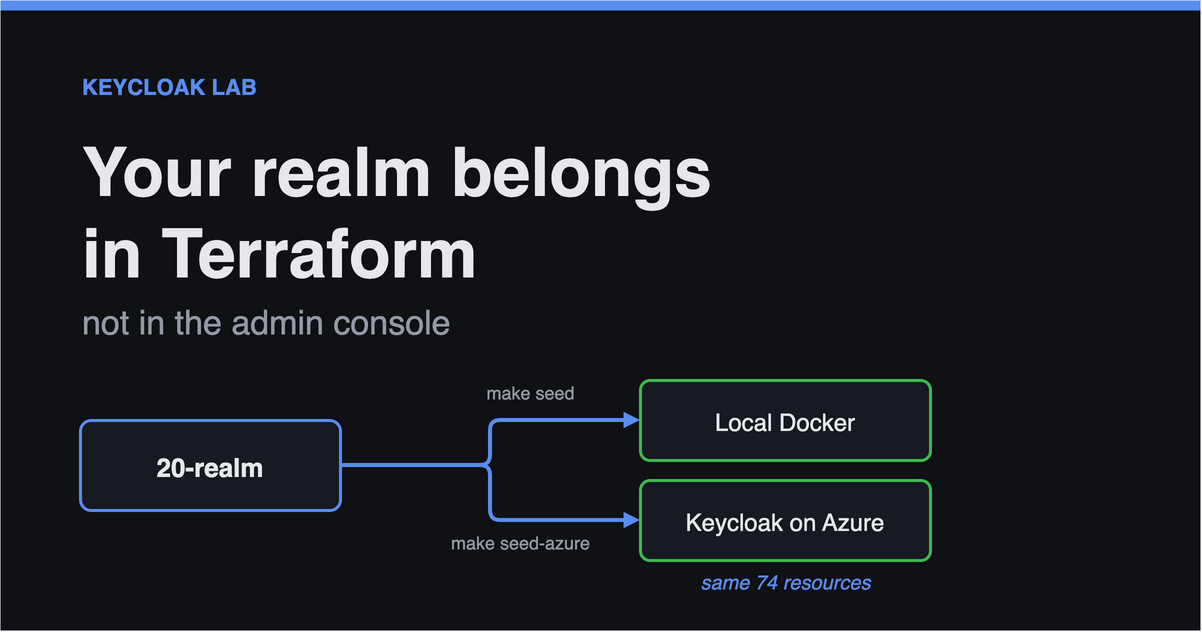
The Keycloak provider talks to the Admin REST API, and that API is identical whether Keycloak is a Docker container on your laptop or a cluster in a cloud. So the same module targets both:
flowchart LR
  TF["<b>infra/terraform/20-realm</b><br/>clients · roles · groups<br/>mappers · auth flows"]
  L["<b>Local Docker Keycloak</b><br/>localhost:8080<br/><i>free, no account</i>"]
  A["<b>Keycloak on Azure</b><br/>Container Apps<br/>+ private Postgres"]
  APPS["React · Vue · Flutter · React Native<br/>Electron · WinUI 3 · .NET API"]

  TF == "make seed" ==> L
  TF == "make seed-azure" ==> A
  APPS -. "same clients,<br/>same tokens" .-> L
  APPS -. "swap one URL" .-> A
1
2
make seed         # 74 resources -> local Docker Keycloak
make seed-azure   # the same 74 -> Keycloak on Azure
Only a URL and a credential differ. That single property is what makes the free local lab a faithful rehearsal rather than a simplified toy — and if it ever stops being true, the apply fails immediately instead of during a migration.
One catch worth knowing early: if you point one module at two environments, use Terraform workspaces. I did not, at first, and seeding Azure quietly overwrote the state of my local realm — leaving the local one untracked and the cloud one impossible to destroy cleanly.
1
terraform workspace select local    # or: azure
Drift becomes a test failure
This is the part I did not expect to care about as much as I do.
Once the realm is code, terraform plan answers “has anyone changed anything by hand?” — and the correct answer is nothing to change:
1
2
$ make plan
No changes. Your infrastructure matches the configuration.
If that plan is not empty, somebody edited the console, and you have both the fact and the detail before it becomes a mystery. My CI applies the module to a real Keycloak on every run, so the claim is checked rather than asserted.
It also means the interesting decisions are written down where they can be argued with. Three from my realm, which I would not have been able to defend from a console screenshot:
Tenants are groups, not realms. One realm per customer gives stronger isolation, but costs a realm each, separate signing keys, and a login page that has to ask “who are you with?” first. Groups keep one issuer and one login experience. Choose realm-per-tenant when tenants need genuinely separate identity providers; choose groups when they are customers of one product.
Roles attach to groups, never to users. Users only get memberships, so onboarding is a single membership change rather than a role audit.
The tenant travels as a group path. A preference, not a constraint — I had this filed as the latter for a while, and it is worth correcting, because “group attributes can’t reach a token” is a thing people repeat. They can. The built-in User Attribute mapper resolves an attribute from the user’s groups when the user doesn’t carry it directly — KeycloakModelUtils.resolveAttribute walks getGroupsStream() — and aggregate_attributes collects it across all of them:
1
2
3
4
5
6
resource "keycloak_openid_user_attribute_protocol_mapper" "tenant" {
  # resolves `tenant` from the user's GROUPS, not only from the user
  user_attribute       = "tenant"
  claim_name           = "tenant"
  aggregate_attributes = false
}
I send the path anyway, for two reasons. The resolution order is implicit: an attribute set on the user silently beats the group’s, and across several memberships you are trusting whichever is found first. And a path is self-describing — /acme/engineering carries the tenant and the unit within it, where a flat tenant: "acme" claim throws away everything above and below. So what travels is groups: ["/acme/engineering"], and the API parses the tenant back out of it.
1
2
3
4
5
6
7
8
9
10
11
12
resource "keycloak_group" "acme_engineering" {
  realm_id  = keycloak_realm.docvault.id
  parent_id = keycloak_group.acme.id
  name      = "engineering"

  # Documented here and readable via the admin API; the token carries the
  # path instead, deliberately.
  attributes = {
    tenant     = "acme"
    department = "engineering"
  }
}
Two things that will bite you
The module is not a straight transcription of the console. Two behaviours cost me real time.
Authentication executions are ordered by creation sequence. Keycloak assigns each execution a priority as it is created, and Terraform parallelises aggressively by default. Apply a step-up flow without constraints and you get the right executions in the wrong order, which breaks authentication in a way that looks nothing like a Terraform problem. The fix is explicit depends_on chains between them.
keycloak_openid_client_default_scopes is authoritative. It replaces the entire default-scope list, so you have to restate every built-in — acr, basic, email, profile, roles, web-origins, plus organization if that feature is on. That list differs between Keycloak versions, which would immediately break the “same HCL everywhere” property. I attach mappers per client instead: more verbose, completely portable.
Try it
The lab is on GitHub and runs locally for free:
1
2
3
4
git clone https://github.com/MagnusJohansson/keycloak-poc
cd keycloak-poc
make up      # Keycloak + Postgres + Mailpit
make seed    # apply the realm with Terraform
Then sign in at http://localhost:8080/admin with admin/admin and look around — the console is still the best way to see a realm, and it will show you everything Terraform just built. Switch from the master realm to docvault first; master administers the server and holds only the admin user, which is a five-minute confusion nearly everyone has once.
Then go and change something in the console, and run make plan. Watching Terraform describe exactly what you just clicked is the moment the argument makes itself.
Next in this series: the failures that produce no error at all — sign-in works, and every API call returns 401.