An MCP server behind Keycloak: what may the assistant do, and for whom?
TL;DR: I added an MCP server to my Keycloak lab, so an AI assistant can list, create and delete documents through an API that Keycloak protects. The tools took an afternoon. The authorization took the rest of the week, because nearly every mistake I made produced a working sign-in and no error. The design that came out of it has two layers: scopes the user consents to say what the assistant may do, and the roles the user already has say what the user may do. The server accepts only tokens issued for itself, and swaps each one for a new token before it calls the API. This post covers that design, five settings that failed silently, and a sign-in that refused a correct password in two of nine CI runs.
My last two posts were about MCP servers that control lab instruments. Those servers run on my own machine and talk to hardware on my bench. Their threat model has one line I was never happy with: there is no caller identity. Whoever can start the process can do everything.
Most MCP servers that matter in a company won’t look like that. They’ll sit in front of an API with real users, tenants and roles, and they’ll be reached over HTTP by an assistant acting for one of those users. I already had the other half of that picture: a Keycloak lab with a realm in Terraform, a .NET API, and six clients. So I added a seventh client, and it’s a different kind from the others.
A web app is a client the user is looking at. An assistant is a client that takes instructions from whatever it reads, including a document title a colleague wrote. The user didn’t write its code and can’t see its reasoning. So the question the server has to answer is narrower than “is this user signed in”. It is: what is the assistant allowed to do, on whose behalf, and who enforces that?
One caveat before the details. This is a lab. It follows the MCP authorization specification of 2026-07-28, and it leans on a Keycloak feature, resource indicators, that is still marked experimental in Keycloak 26.6. I’ve run it on my machine and in CI, against a real Keycloak both times, and nowhere else.
Three parties
sequenceDiagram
  participant C as MCP client<br/>(Claude Code)
  participant M as MCP server<br/>:5002/mcp
  participant K as Keycloak
  participant A as DocVault API<br/>:5001

  C->>M: tools/list (no token)
  M-->>C: 401 + where my metadata is
  C->>M: GET /.well-known/oauth-protected-resource/mcp
  M-->>C: resource, authorization server, scopes
  C->>K: sign in (PKCE)<br/>resource=http://localhost:5002/mcp<br/>scope=docvault:read
  Note over K: user signs in and consents:<br/>"Let the assistant list your documents"
  K-->>C: token: aud = http://localhost:5002/mcp
  C->>M: tools/call list_documents + token
  Note over M: check signature, issuer,<br/>aud = me, scope
  M->>K: token exchange (RFC 8693)<br/>audience=docvault-api
  K-->>M: token: aud = docvault-api,<br/>alice's roles and tenant group
  M->>A: GET /documents + exchanged token
  A-->>M: acme's documents
  M-->>C: tool result
Each party is one object in the realm:
| Party | Keycloak object | What it holds |
|---|---|---|
| MCP client (the assistant’s host) | a public client, PKCE, consent required | a token for the MCP server, with scopes and no roles |
| MCP server | a confidential client whose client_id is its URL | a secret, used only to exchange tokens |
| DocVault API | unchanged | nothing new: it validates tokens as before |
The last row is the part I like most. The API didn’t change. It still validates a token addressed to itself, carrying a user’s roles and tenant, the same as when the React app calls it.
Two layers of permission
| Layer | Says | Set by | Enforced by |
|---|---|---|---|
Scopes: docvault:read, docvault:write, docvault:delete | what the assistant may do | the user, on the consent screen | the MCP server |
| Roles and tenant | what the user may do | an administrator, through groups | the API, as always |
A call succeeds only where both layers allow it. The lab’s four demo users each show one edge:
| User | Scope granted | Call | Outcome |
|---|---|---|---|
| alice (editor) | read | list_documents | her tenant’s documents |
| alice | read | create_document | 403 challenge: the assistant lacks docvault:write |
| alice | read, write, delete | delete_document | refused by the API: the scope is there, the admin role isn’t |
| carol (admin) | read, delete | delete_document | deleted |
| bob (other tenant) | read | list_documents | his tenant’s documents only |
| dave (no roles) | read | list_documents | refused by the API, reported as a tool error |
The third row is the one to remember. A scope never widens what the user can do. Granting an assistant docvault:delete doesn’t make alice an administrator. It only means that if she were one, the assistant could use that.
The consent screen is where the first layer becomes visible. This is Keycloak asking, in the browser, before any token is issued:
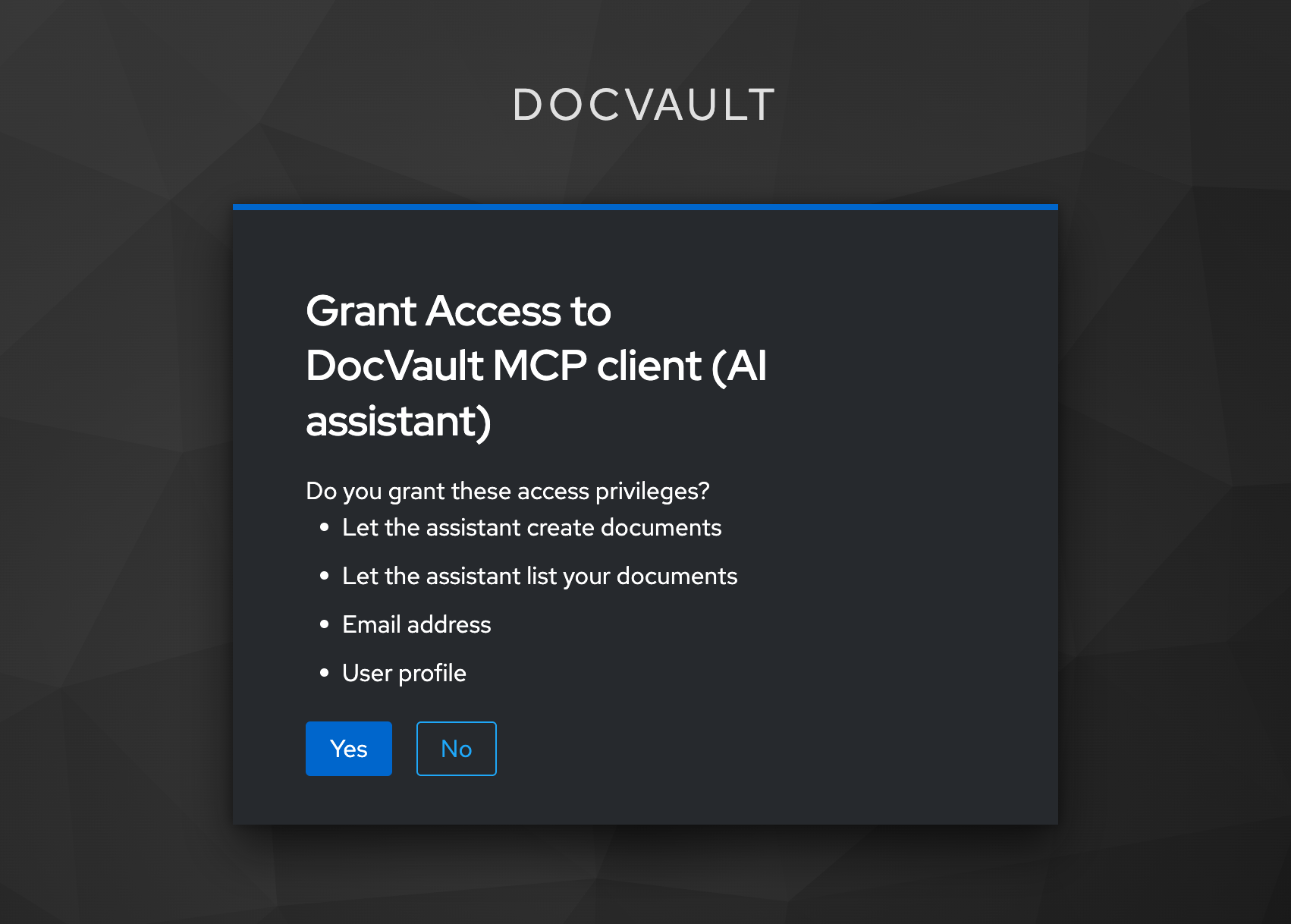 Keycloak’s consent screen. The two “Let the assistant…” lines are the scopes.
Taking that screenshot found one more problem. The screen used to have a fifth line, “User roles”. The assistant’s token has never carried roles, and a test asserts that. But Keycloak lists every scope attached to a client, and its built-in roles scope is attached to all of them by default. So the user was being asked to grant something the assistant never receives. The client now drops that scope, and the end-to-end check reads the consent screen as well as the token.
The second row of the table is what it looks like from the chair. The first sign-in asks only for docvault:read. When I ask Claude Code to create a document, the server answers with the challenge MCP specifies:
1
2
HTTP/1.1 403 Forbidden
WWW-Authenticate: Bearer error="insufficient_scope", scope="docvault:write"
and Claude Code turns that into a question:
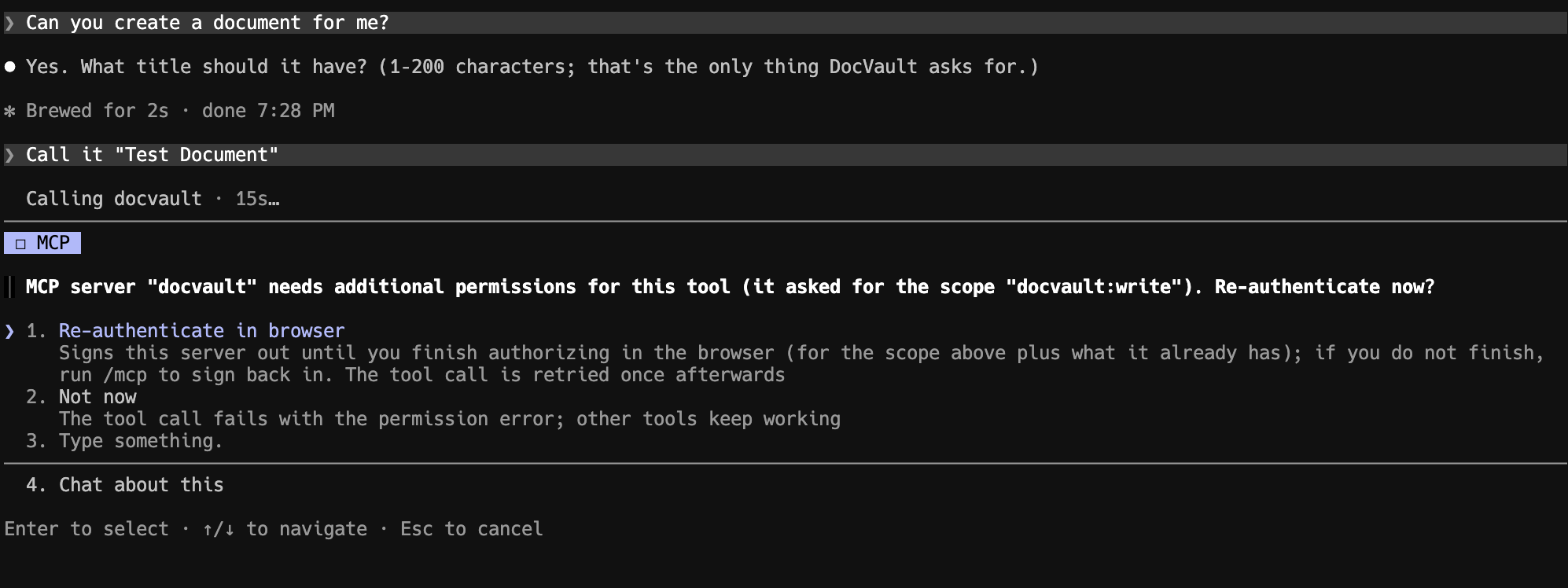 Claude Code, after the server’s scope challenge.
I say yes, consent to one more permission in the browser, and the call is retried:
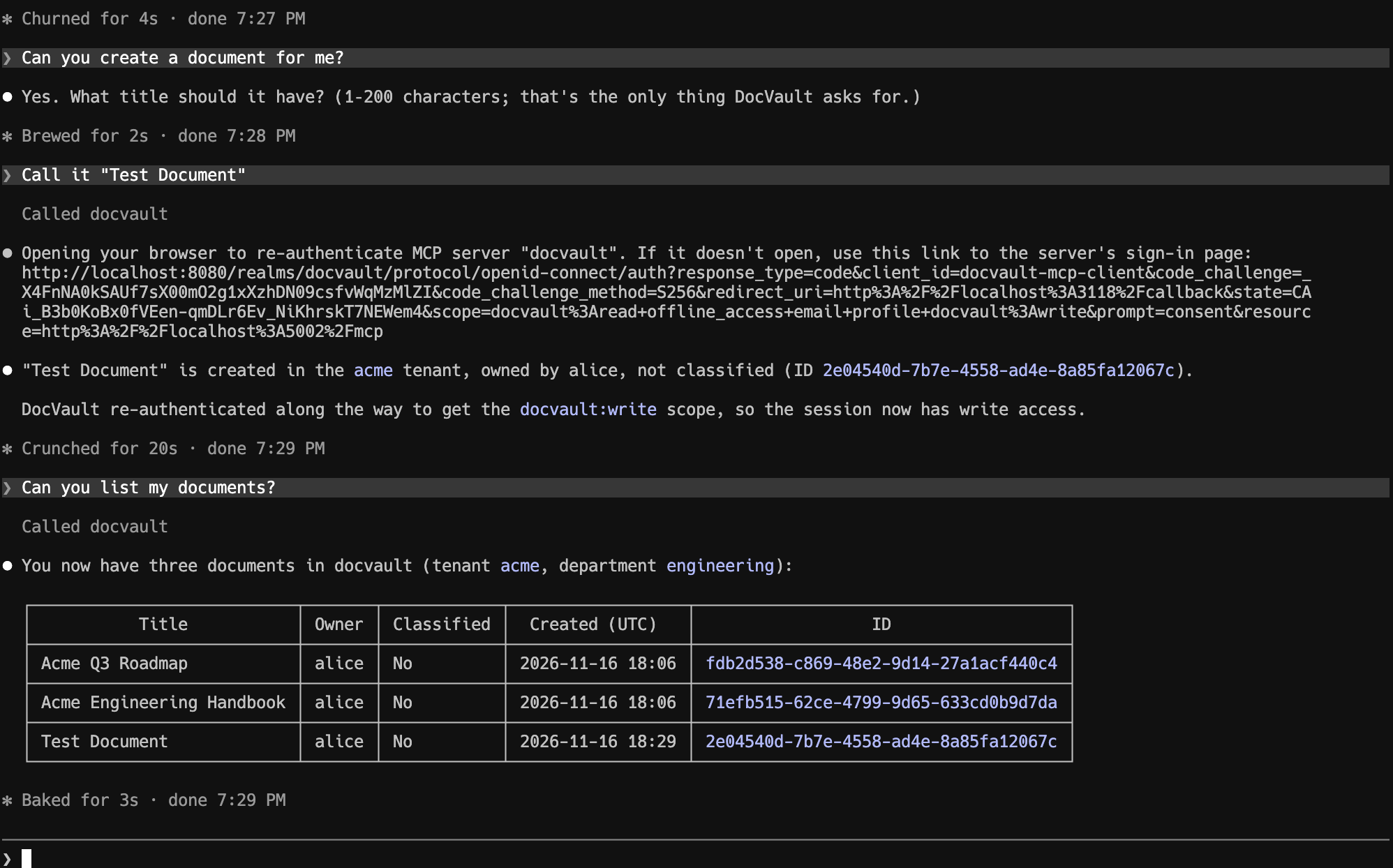 The sign-in link Claude Code opened asks for
docvault:write and names the server in resource=. Then the call succeeds.
The assistant got write access at the moment it needed it, and I was asked.
The token goes no further
The MCP specification forbids “token passthrough”: a server must not forward the token it received to the API behind it. Here that rule enforces itself, because the incoming token is addressed to the MCP server and the API would refuse it. The server exchanges it instead (RFC 8693):
1
2
3
4
5
["grant_type"]           = "urn:ietf:params:oauth:grant-type:token-exchange",
["subject_token"]        = subjectToken,
["subject_token_type"]   = "urn:ietf:params:oauth:token-type:access_token",
["requested_token_type"] = "urn:ietf:params:oauth:token-type:access_token",
["audience"]             = settings.ApiAudience,
Keycloak answers with a new token: same user, addressed to the API, carrying that user’s document roles and tenant group. The server has no identity of its own to act with. It has no service account and can’t sign anyone in. All it can do is turn “alice, for me” into “alice, for the API”.
Five settings that failed without an error
In an earlier post I described a family of Keycloak mistakes where the login works and the API then rejects everything. This project added to the family. In each case below, nothing complained at the point where I got it wrong.
1. The server’s client_id has to be its URL
With resource indicators on, a token requested with resource=http://localhost:5002/mcp carries exactly that URL as its audience. Keycloak’s standard token exchange lets a client exchange only a token whose audience contains that client’s own client_id.
I first named the client docvault-mcp. Sign-in worked. Consent worked. The token was valid and the server accepted it. Then every tool call failed at the exchange:
1
403 access_denied "Client is not within the token audience"
The audience was a URL and the client was a short name, so they could never match. The fix looks wrong in the admin console and is deliberate:
1
2
3
4
5
6
7
8
9
10
resource "keycloak_openid_client" "mcp_server" {
  realm_id  = keycloak_realm.docvault.id
  client_id = var.mcp_resource_url   # "http://localhost:5002/mcp"

  access_type                     = "CONFIDENTIAL"
  standard_flow_enabled           = false
  service_accounts_enabled        = false
  standard_token_exchange_enabled = true
  full_scope_allowed              = false
}
2. Without the feature flag, only the audience changes
Keycloak ignores the resource parameter when the resource-indicators feature is off. Sign-in still works. The token is still valid. Its audience just comes from somewhere else.
A server that checks its audience properly then refuses every token, which at least is noticeable. A server that checks loosely carries on, and has quietly lost the property the whole design rests on. So the lab’s end-to-end check asserts two things nothing else would notice: that the audience is exactly the server’s URL, and that an unknown resource is refused with invalid_target.
3. .NET’s audience check is more generous than it looks
Two defaults, both reasonable for most APIs and both wrong here:
- A trailing slash is ignored.
…/mcp/and…/mcpare different resources, and the default validator treats them as one. - Any one matching audience is enough. A token for
[this server, something else]passes.
MCP asks for tokens issued specifically for the server. So:
1
2
3
4
ValidAudience = settings.Resource,
IgnoreTrailingSlashWhenValidatingAudience = false,
AudienceValidator = (audiences, _, parameters) =>
    audiences.Count() == 1 && audiences.Single() == parameters.ValidAudience,
A unit test with a forged token found the first one. I hadn’t thought to look.
4. The SDK’s metadata follows the request
An MCP client finds the authorization server through a metadata document the MCP server publishes (RFC 9728). By default, the C# MCP SDK version I used builds the resource value in that document from the request’s Host header, and answers under any path suffix. A caller could therefore make the server describe a resource it isn’t.
Giving the SDK a relative metadata path fixed the document and not the 401, whose link to the metadata was still built from Host. The server now sets an absolute URL: one fixed document, a constant link, and a 404 for every other path.
5. Full scope would have carried an administrator’s other roles
carol is a document admin and also a platform-admin, a realm role that opens the API’s /admin endpoints. With Keycloak’s default, “full scope allowed”, the exchanged token would carry both. An assistant acting for her with docvault:delete could then have reached /admin, which no scope on the consent screen mentions.
The server’s client has full_scope_allowed = false and is granted only the API’s document roles. An assistant acting for carol can delete a document and can’t touch the admin endpoints.
There are three more of these in the lab’s write-up, including why a user with no roles can’t be exchanged at all without one extra mapper.
A correct password, refused two times in nine
This one had nothing to do with MCP, and I’d have missed it without the MCP work.
To test the server properly, CI now does what a person does. It starts a fresh Keycloak, applies the realm, starts the API and the MCP server, and signs in as each demo user through the real login page. Twice in nine runs, the very first sign-in failed:
1
400 Invalid username or password
The password was correct, and it’s a constant in the script. A re-run passed. Nothing in my change touched the login flow.
The lab has a custom browser flow for step-up authentication: a password subflow for ordinary access, then an OTP subflow that runs only when a higher level is requested. The order of those two obviously matters, and I believed I had pinned it. My understanding was that Keycloak orders the steps of a flow by when they were created, so the Terraform chained them with depends_on.
That turned out to be an out-of-date mental model. As far as I can tell from Keycloak’s source, a flow’s steps are sorted by their priority and nothing else. I hadn’t set one, so every step had the same value, 0, and ties come back in whatever order the database returns them. On most fresh Keycloaks that happened to be the order I wanted. On some it wasn’t: the OTP subflow came first, the sign-in reached the OTP form with no user identified yet, and Keycloak reported that as a bad password.
I’m not the first to trip over this. A Keycloak forum thread from July 2024 describes the same thing after an upgrade to Keycloak 25: flows created through the API had come out in call order before the upgrade, and in a different order on every run after it, with every step at priority 0. The poster’s fix was the same as mine. The thread has no reply from a maintainer, so I can’t say whether the change was intended. It does explain where the creation-order idea comes from: it seems to have been true once.
The fix is one attribute on each of the eight steps:
1
2
3
4
5
6
7
resource "keycloak_authentication_subflow" "loa1" {
  realm_id          = keycloak_realm.docvault.id
  parent_flow_alias = keycloak_authentication_subflow.forms.alias
  alias             = "stepup-loa1-password"
  requirement       = "CONDITIONAL"
  priority          = 10
}
and a CI step that reads the flow back from Keycloak’s admin API and fails if the eight steps aren’t in the intended order.
I should be precise about how sure I am. I didn’t capture Keycloak’s event log from a failing run, so I have no direct proof that those two runs had the flow in the wrong order. What I have is the source reading, a local Keycloak where I could see equal priorities, and the realm job signing in correctly on every run since the fix. There have been more than twenty-five so far. That’s good evidence, and it isn’t a proof.
What bothers me is how long this sat there. The flow had been in the repository since August, and so had the depends_on chains with a confident comment explaining why they were needed. Every time I’d signed in by hand, it had worked. It took a test that starts from an empty Keycloak, many times, to roll the dice often enough.
What isn’t here
- Client registration by metadata document. MCP now prefers it, and Keycloak 26.6 has it as a second experimental feature. The MCP client here is pre-registered in Terraform, like the desktop clients. Dynamic client registration is deprecated by MCP and isn’t used.
- MFA step-up for a tool. The API’s classified endpoint asks for a stronger sign-in with an
acrchallenge. MCP’s challenge carries scopes, notacrvalues, so there is no tool for classified documents. It couldn’t tell a client what to do. - Azure. The lab’s Azure deployment doesn’t enable the feature flag and doesn’t host this server.
- Production hardening. No rate limiting, no token caching, and an in-memory document store behind it.
- A defence against the model reading instructions. A colleague can put instructions in a document title, and nothing here stops a model reading them. What limits the damage is the two layers: the assistant can do only what was consented to, as that user, and
delete_documentis marked destructive so a client asks first.
What I took away
- Give the assistant its own permissions. Scopes for the assistant and roles for the user are two questions. Folding them into one means an assistant can do everything its user can.
- Bind the token to the server, exactly. One audience, compared exactly, slash included.
- Exchange the token before calling the API. The API keeps validating what it always validated, and the MCP server never holds a token that works anywhere else.
- Assert what the token contains. Most of the mistakes above left sign-in working. The end-to-end check decodes the token and compares
aud, because nothing else would notice. - Start your tests from nothing. The flaky sign-in was only visible from an empty Keycloak, repeated.
Try it
The lab is on GitHub, and v1.0.1 is the version this post describes. It needs Docker, .NET 10 and Terraform:
1
2
3
4
5
git clone https://github.com/MagnusJohansson/keycloak-poc
cd keycloak-poc
make up && make seed && make api     # Keycloak, the realm, the API
make mcp                             # the MCP server on :5002
make assert-mcp                      # 25 checks against the real stack
Then, from Claude Code:
1
claude mcp add --transport http --client-id docvault-mcp-client docvault http://localhost:5002/mcp
Run /mcp, sign in as alice (the demo password is in the README), and ask for your documents. Then ask it to create one, and watch it come back and ask you first.
If you want the muscle memory, break it on purpose. Rename the server’s client to something short and run make seed. You’ll get a flawless sign-in, a consent screen, and a tool that fails every time.
Earlier in this series: Sign-in works. Every API call returns 401. and Securing an MCP server against prompt injection.
I wrote this post with Claude’s help, the same way I built the server. A second, independent Claude session reviewed the server over three rounds. The decisions and the final check of every claim are mine.